Table of Contents
Assignment
Group assignment

* Join a introduction session to get an overview of networking possibilities with XIAO ESP32
* Pick a group leader who is going to populate the group assignment page

Individual assignment

* Link to the group assignment page and describe what did you learn individually.
* Explore the WiFi capabilities of the XIAO ESP32C3 board.
* Plug it into one of the boards you produced earlier.
* Program the XIAO board to spawn an Access Point and create a simple REST API.
* The REST API should have endpoints for controlling output device(s) of your board as well as reading input.
* Document as you go and publish content on a page on your documentation website.
Group
Research
Still going with Rust, building on the experience from the last two test programs on the ESP32-C3 and ESP32-S3 respectively. This week the intent was to get these boards to talk to each other. Simply, pressing the button on the C3 board should activate the motor on the S3 board.
Because of my choice of programming language, I couldn’t directly follow the instructions on the Xiao getting started guides. So my starting point was the Awesome ESP Rust repository, which would hopefully have example projects.
The relevant crate for wifi and so on is esp-wifi. It’s actual README is of course highly relevant.
The crate has an example for creating an Access Point.
Let’s break down the task a bit. No need to immediately jump to board-to-board communication. Let’s first try to print a message to the computer screen every time the button is pressed.
Button Print
The process to get code to compile was painful. There were so many errors and dead ends, and I was so tunnel-visioned to get it to work that I didn’t take time to document.
I eventually did get the example codes from esp-wifi to compile and run, and I was able to connect the ESP32 to my wifi network. I didn’t manage, however, to do anything with that connection. I also tried running the bluetooth example, but couldn’t connect to the device. So I’m condensing maybe two days worth of work into these two disappointing paragraphs.
I looked elsewhere. I found a tutorial series that seemed promising. It was only under two months old and really in depth. The only downside was that there was seemingly no no_std option.
I implemented the code for the unsecure BLE client. After lots of config and wrestling with the compiler:
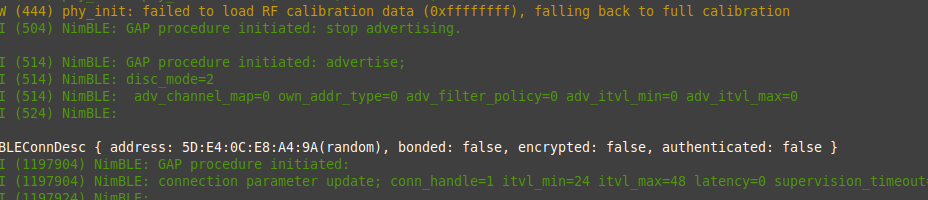
It seems like I managed to connect to the chip with my phone.
At this point in the process, time had marched on and the next assignment was presented, application programming. I moved to doing that, as it was more urgent for my final project. I made progress such that I was able to send data from the chip to my pc. That made this initial button test obsolete, so I could move on to making the button do something more interesting.
Button to Motor
I would next attempt to connect the two boards to each other using the espnow protocol. I imagined it would be more straightforward than bluetooth or wifi.